Moving from WordPress to Webflow sounds exciting on paper. More control. Cleaner design. Fewer plugins. Faster sites. That’s exactly why so many brands reach out to a website development company or a web development agency asking for this migration.
Here’s the thing. Most blogs talk about why to migrate and how to migrate. Very few talk about what quietly breaks, slows you down, or costs rankings if you don’t plan properly.
This guide covers what people keep asking but rarely get straight answers to. The real pitfalls. The uncomfortable trade-offs. And the things you need to fix before they hurt performance, SEO, or your marketing workflow.
Why businesses are moving from WordPress to Webflow in the first place
Before digging into pitfalls, let’s be honest about why this shift is happening.
WordPress sites often reach a point where:
- wordpress maintenance becomes constant and expensive
- plugin maintenance feels endless and risky
- wordpress performance depends heavily on third-party tools
- Design changes require developers every time
Webflow promises a different experience. More visual control. Fewer dependencies. Cleaner output. Strong hosting. Better collaboration for teams.
That promise is real. But it’s not automatic.

Pitfall 1: Assuming content migration is just export and import
This is where most migrations start going wrong.
WordPress content isn’t just posts and pages. It’s:
- Custom post types
- Advanced Custom Fields
- Nested taxonomies
- Reusable blocks
- Shortcodes and plugin-driven layouts
When people hear Content Migration, they imagine a simple CSV upload. In reality, Webflow’s CMS structure is fundamentally different.
This is where Complex Content mapping becomes critical.
If you don’t map:
- Old post types to new collections
- Relationships between content items
- Repeated fields and dynamic elements
You’ll end up rebuilding content manually or worse, flattening it in ways that limit future scalability.
Pitfall 2: Losing SEO data without realizing it
This one hurts quietly.
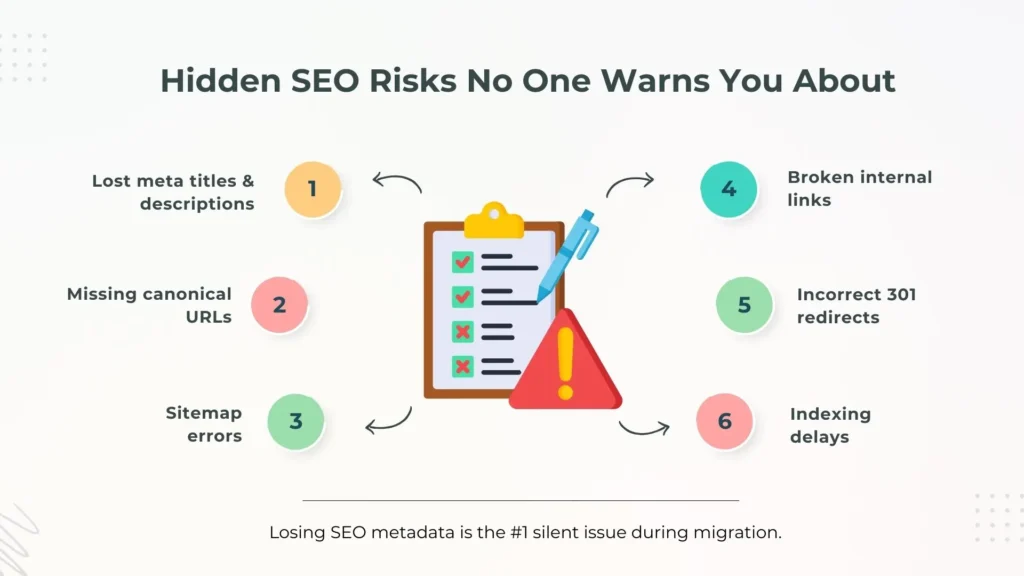
During wordpress to webflow migrations, teams often focus on design and forget the invisible SEO layer. That’s how losing SEO metadata happens.
Commonly missed items include:
- Meta titles and descriptions
- Canonical URLs
- Open Graph data
- Structured internal links
- Category and tag URLs
Even if your new site looks better, search engines don’t care about aesthetics. They care about consistency and signals.
Without careful planning:
- Rankings dip
- Indexed pages drop
- Traffic declines slowly but steadily
A good web development agency treats SEO data as content, not an afterthought.
Pitfall 3: URL structure changes that break trust with search engines
Webflow gives you flexibility, but that freedom can cause damage if misused.
WordPress URLs often include:
- Categories
- Date structures
- Custom slugs tied to post types
When those URLs change without proper redirects, search engines see it as lost content.
301 redirects help, but only if:
- They are mapped one-to-one
- No redirect chains exist
- Canonicals point correctly
Many migrations fail not because redirects were missing, but because they were rushed.
This is one of the most common reasons brands see traffic drops after switching platforms, even when everything else looks perfect.
Pitfall 4: Assuming Webflow automatically fixes page speed
Yes, Webflow sites are generally faster. No, they are not magically optimized.
Page speed optimization still matters.
Things that slow Webflow sites down:
- Uncompressed images
- Excessive animations
- Poorly structured CMS queries
- Heavy third-party scripts
Teams coming from WordPress often expect instant performance wins because they escaped bloated themes and plugins. But performance still depends on how the site is built.
Pitfall 5: Underestimating the loss of plugin-driven functionality
WordPress plugins do a lot of heavy lifting.
Forms, SEO, caching, multilingual content, memberships, analytics, CRM connections. When you migrate, those plugins don’t come with you.
This is where plugin maintenance shifts into integration planning.
Webflow handles many things natively, but not everything. Some features require:
- Third-party tools
- Custom scripts
- Manual workflows
If this isn’t planned upfront, teams realize mid-project that key features are missing or require workarounds.
This is especially important for marketing-heavy sites that rely on automation and tracking.
Pitfall 6: CMS limits nobody mentions upfront
Webflow CMS is powerful, but it has limits that WordPress users don’t expect.
Examples include:
- Collection item limits
- Fewer nested relationships
- Less flexibility compared to advanced WordPress custom post types
This matters most for:
- Large blogs
- Resource hubs
- Job boards
- Event-driven content
Without proper planning, teams discover these limits only after migration, when restructuring becomes expensive.
That’s why content architecture planning is just as important as visual design.
Pitfall 7: Design freedom without guardrails
One of Webflow’s biggest advantages is Design Freedom.
But that freedom can turn into inconsistency if not managed well.
Unlike WordPress themes, Webflow lets anyone with access change layouts, spacing, and components visually. Without:
- Design systems
- Component rules
- Naming conventions
Sites slowly lose structure.
This becomes a problem for brands scaling content creation or working with multiple contributors. Design freedom needs boundaries, not restrictions.
Pitfall 8: Marketing teams gaining control without processes
Webflow enables real Marketing Team Autonomy. That’s a good thing.
But autonomy without process leads to:
- Broken layouts
- Inconsistent SEO practices
- Accidental content deletions
Teams moving from WordPress often underestimate how much freedom Webflow gives non-developers.
The fix isn’t limiting access. It’s:
- Clear CMS fields
- Locked components
- Training on best practices
Smart web development services include handover documentation, not just site delivery.
Pitfall 9: Thinking migration ends at launch
Launch day feels like the finish line. It’s not.
Post-migration tasks often ignored:
- Search Console re-verification
- Sitemap testing
- Crawl error monitoring
- Performance benchmarking
Without this, small issues turn into long-term problems.
This is why many businesses work with a WebFlow Migration Partner instead of treating migration as a one-time task.
Pitfall 10: Choosing the wrong partner for the job
Not every web development agency that builds Webflow sites understands WordPress deeply. And not every WordPress expert understands Webflow’s CMS logic.
Migration requires both.
A reliable website development company will:
- Audit content before design
- Map CMS structures properly
- Preserve SEO signals
- Plan integrations early
- Optimize for speed and scale
Skipping this due diligence usually costs more later.
What people are really asking before migrating
Behind every search about wordpress to webflow, people are asking:
- Will I lose traffic?
- Will content break?
- Will my team struggle to manage the site?
- Will performance actually improve?
- Will future updates be easier?
The honest answer is this.
Webflow can absolutely outperform WordPress in flexibility, speed, and usability. But only when migration is treated as a strategic rebuild, not a platform swap.
Handled correctly, businesses reduce wordpress maintenance, improve wordpress performance, gain real design control, and give marketing teams independence without chaos.
Handled casually, the migration creates new problems instead of solving old ones.
FAQ’s
1. Is migrating from WordPress to Webflow worth it?
Yes, if you want less ongoing maintenance, better design control, and a cleaner CMS experience. It’s not worth it if your site depends heavily on complex plugins without Webflow alternatives.
2. Will I lose SEO rankings when moving from WordPress to Webflow?
You can avoid ranking drops if redirects, metadata, URL structures, and indexing are handled correctly. SEO loss usually comes from poor planning, not the platform change itself.
3. Can all WordPress content be migrated to Webflow?
Most content can be migrated, but complex custom post types, nested data, and plugin-generated content require careful mapping and sometimes manual rebuilding.
4. How long does a WordPress to Webflow migration take?
Small sites may take 2–4 weeks. Larger or content-heavy sites can take 6–10 weeks, depending on complexity, integrations, and SEO requirements.
5. Is Webflow faster than WordPress?
Webflow generally delivers better performance, but page speed still depends on image optimization, clean structure, and responsible use of scripts and animations.
6. Is Webflow suitable for large blogs or content-heavy websites?
Yes, but large sites require careful CMS planning, collection limits awareness, and structured content architecture before migration begins.